Subdomains may be quite hard to setup, besides that themes usually do not apply subdomain filters in their queries.
Means, if you setup country-based subdomains, the theme will show all the cities in its queries on every country-based subdomain.
So let's say you have a US subdomain, you will see there also cities from Germany.
Search itself will always apply subdomain filters – but as mentioned above, not all theme parts may apply subdomain filters and it’s left on the user to customize it.
This area allows you to assign subdomains to different parts of your Osclass site. Subdomain-based routing offers a unique way to organize or partition content by category, location, user, or language. Before enabling this feature, be sure you understand the technical requirements and potential limitations, including DNS wildcard records, Apache or hosting configuration, SSL certificates, and potential theme adjustments.
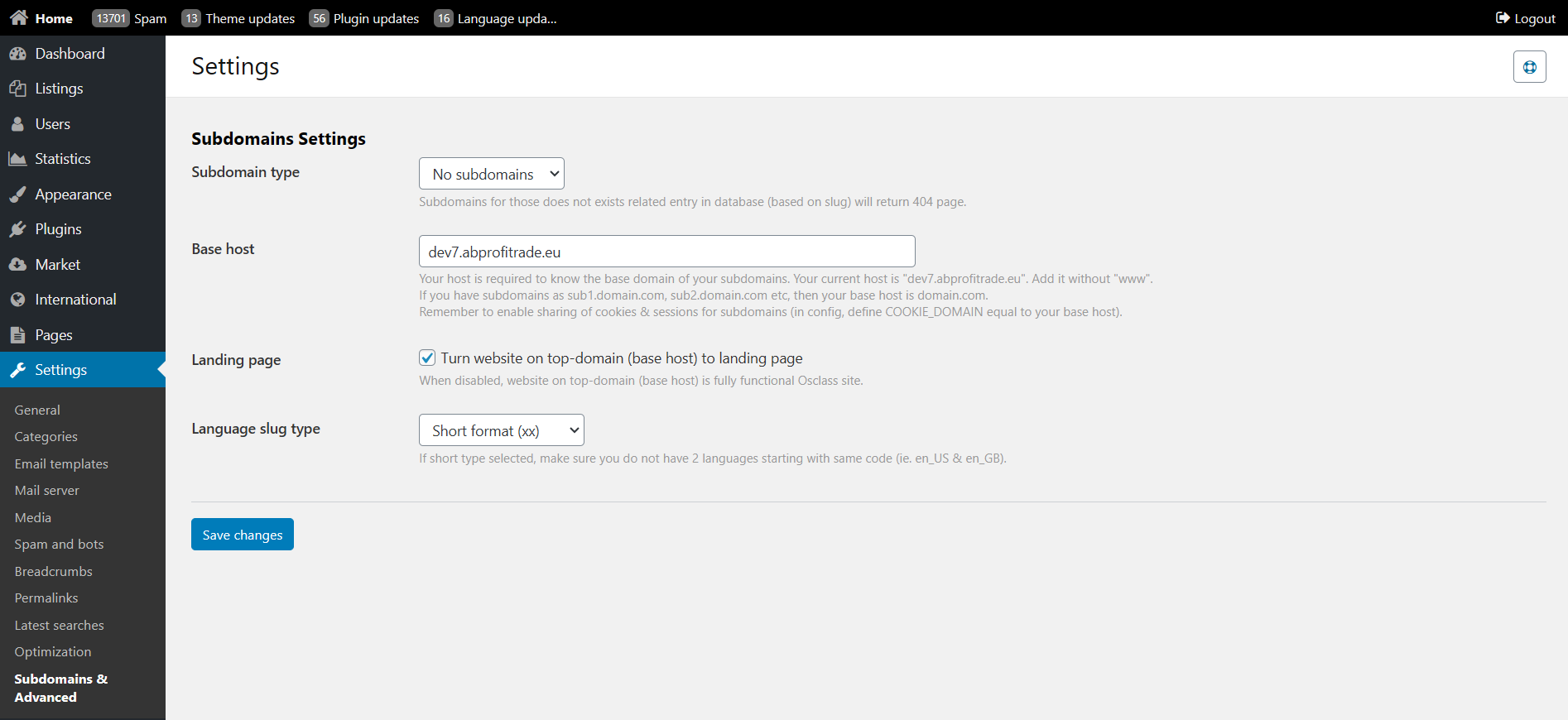
Once subdomains are enabled, update your config.php and update WEB_PATH.
Old value should look like this:
define('WEB_PATH', 'https://yoursite.com/');New value:
define('WEB_PATH', 'https://' . (!empty($_SERVER['HTTP_HOST']) ? $_SERVER['HTTP_HOST'] : 'yoursite.com') . '/');
If you disable subdomains, make sure to update your WEB_PATH back to original!
cars.example.com shows only listings from the “Cars” category, while jobs.example.com shows job listings, etc.usa.example.com or miami.example.com), providing localized listings and potentially distinct audiences.username.example.com. This could work for multi-vendor sites or personal storefronts.en.example.com, es.example.com, etc. Each subdomain shows the site in a different language. You can specify short (xx) or long (xx-YY) language codes.Subdomains that do not match an existing slug (e.g., a category that doesn’t exist in the database) will return a 404 page by default. Therefore, ensure that each valid subdomain corresponds to a real category, country, region, city, or user in your database.
example.com) in the “Base host” field without www. This domain will serve as the root for subdomains, such as cars.example.com or en.example.com.*.example.com) pointing to your server’s IP address. If you do not use a wildcard record, you must manually create DNS entries for every subdomain you want to support.cars.example.com to jobs.example.com), define COOKIE_DOMAIN in your config.php (or equivalent Osclass config) as example.com.*.example.com and direct them to the same Osclass installation. Below is a sample Apache httpd.conf or vhost.conf snippet:
<VirtualHost *:80>
    ServerName example.com
    ServerAlias *.example.com
    DocumentRoot /var/www/osclass
    <Directory /var/www/osclass>
        AllowOverride All
        Require all granted
    </Directory>
</VirtualHost>* as the subdomain name. The panel automatically adjusts DNS and server settings on your behalf.*.example.com). Otherwise, each subdomain requires its own SSL certificate. Make sure your ServerAlias lines up with the wildcard domain name.mod_rewrite is enabled and .htaccess overrides are allowed so Osclass can handle permalinks and subdomain routing seamlessly. Typically, AllowOverride All is set in your VirtualHost or httpd.conf for the DocumentRoot.example.com see a custom landing page, while the real Osclass content only appears on subdomains (e.g., cars.example.com, jobs.example.com).example.com acts like a “normal” Osclass site, just as if subdomains were not in use.US,DE,FR) so that only users from those countries can see listings on the matching subdomain. Other users are redirected to the top-level domain, potentially with an error message.en or fr. Avoid conflicts by ensuring no two languages share the same prefix.en-US or en-GB. Useful for sites supporting multiple dialects or regions of a single language.*.example.com). Install it properly on your server so cars.example.com and jobs.example.com both serve secure pages.<VirtualHost *:443>
ServerName example.com
ServerAlias *.example.com
DocumentRoot /var/www/osclass
SSLEngine on
SSLCertificateFile /etc/ssl/certs/example.com.crt
SSLCertificateKeyFile /etc/ssl/private/example.com.key
SSLCACertificateFile /etc/ssl/certs/ca-bundle.crt
<Directory /var/www/osclass>
AllowOverride All
Require all granted
</Directory>
</VirtualHost>Once you finalize your subdomain configuration, click Save changes. If you experience 404 errors, missing subdomain records, or cookie/login issues, verify:
COOKIE_DOMAIN matches your base domain (e.g., example.com).mod_rewrite, wildcard ServerAlias) are correct.Once you have your subdomains setup, make sure you use https and correct SSL certificate.
Usually, only what you need to make sure is that your current SSL certificate covers all subdomains (*.domain.com), but in some cases, this may not be enough.
Example is, when you run subdomain on your.domain.com and subdomains are *.your.domain.com, in that case i.e. Let’s encrypt certificate may not cover subdomains and can report errors.
This can be fixed! … but only for those subdomains where you know all entries and it’s less than 100 of them (country/region subdomains, but optionally also city subdomains, if you have just few cities).
Solution is to create certificate for each subdomain specifically, not using wild card:
This will avoid using wild cards and secure your subdomains with valid SSL. In case you need wildcard on this level, you may need to look for paid SSL certificate that can handle not just *.domain.com wildcard, but also *.*.domain.com wildcard.
Now you have subdomain based classifieds!
You may wonder what kind of data are used to create subdomain URL, especially what is replaced by “*”
In case you access subdomain to that does not exists entry in database, Osclass returns 404 page.
You may get parameter value also by calling osc_subdomain_id() that contains ID of current subdomain (empty on top-domain).
Slugs for locations can be configured in “Backoffice > International > Locations”, for categories in “Backoffice > Settings > Categories” and for users in “Backoffice > Users > Edit user”