Osclass introduced a new feature starting from version 4.1, allowing the setup of native names for countries, regions, and cities. This is a major improvement for multilingual websites.
The primary goal of location translations is not to translate cities or regions into multiple languages (which would require significant database resources and slow down Osclass). Instead, Osclass allows translating locations into a single native language format.

This is particularly useful for:
For example, a website in Dubai might offer both Arabic and English. If location names are in English, Arabic users might find them difficult to understand, and vice versa. With this feature, Osclass allows locations to be displayed in their native format when needed.
Osclass has introduced several new fields for location translations:
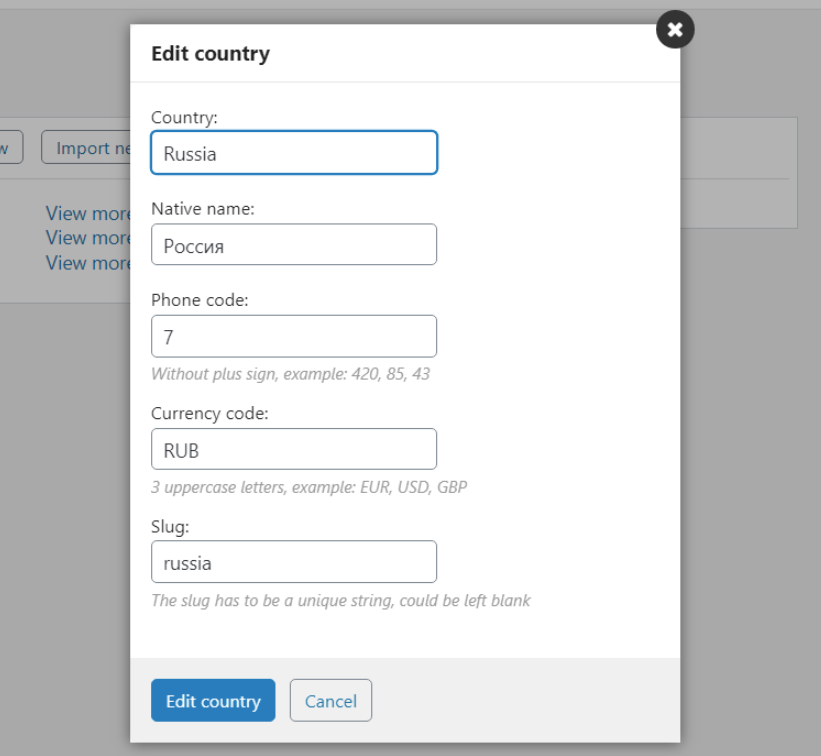
To enable native location names:
When enabled, Osclass will display native names wherever they are available. If a native name is empty, Osclass will default to the original name.
Osclass core has been updated to support native location names, but complex themes may require manual updates. Below are the necessary modifications.
If your theme retrieves location data using the following methods, modifications are required:
$country = Country::newInstance()->someFunction();
$region = Region::newInstance()->someFunction();
$city = City::newInstance()->someFunction();
And location names are printed like this:
$country['s_name'];
$region['s_name'];
$city['s_name'];
You must modify them as follows:
$country['s_name'] --->  osc_location_native_name_selector($country);
$region['s_name']  --->  osc_location_native_name_selector($region);
$city['s_name']    --->  osc_location_native_name_selector($city);
Explanation: The function osc_location_native_name_selector() checks whether the selected language has “Native location names” enabled. If so, it uses s_name_native (native name). Otherwise, it falls back to the original s_name.
Many themes fetch location names via AJAX, especially for dropdown selections. If your theme does not display native names in these cases, follow this example to update JavaScript functions.
success: function(data){
  var length = data.length;

  if(length > 0) {
    result += '';
    for(key in data) {
      result += '' + data[key].s_name + '';
    }
  }
success: function(data){
  var length = data.length;
  var locationsNative = "";

  if(length > 0) {
    result += '';
    for(key in data) {
      var vname = data[key].s_name;
      if(data[key].hasOwnProperty('s_name_native')) {
          if(data[key].s_name_native != '' && locationsNative == "1") {
              vname = data[key].s_name_native;
          }
      }

      result += '' + vname + '';
    }
  }
Explanation: The function checks if native names exist and if the user has selected a language where native names should be displayed. If both conditions are met, the native name is used.
With these updates, you can now offer native location names to users in selected languages. This enhances usability, improves localization, and ensures better readability for users who prefer their native script.